Disclaimer

The content of this material are challenges faced onsite and how I personally resolved them. Please be noted that solutions posted here

1> should not be considered as ultimate. The material may be considered for reference only.

2> should not be considered as guarantee that solutions may work. Contact Cyberoam support before making any changes.

3> blog does NOT belong to the Cyberoam. It's a blog...a personal blog.

Changes done after referring this site may seriously damage the network. So...

........DO CHANGES AT YOUR OWN RISK

(please contact cyberoamsupport before implementing any changes)

Saturday, 28 June 2014

Which comes first : Compliance or Security?

Recently I was browsing through my linkedin profile and I see lot number of security professionals drawn towards this question:

What comes first Compliance or Security?

I have given a long thought on this question and I asked myself few more questions pertaining to the above question:

1> Can an organisation be secure without a compliance? Answer is reasonably simple yes.
2> does man secures himself or searches for compliance when in wild? obviously Security

on contrary I also asked myself questions to contradict above answers

1> How can an organisation find itself secure without a framework? a compliance is necessary
2> How can a large society function without a framework? yes its necessary.

But again I thought, let's bring it down to basics

1> what would I require to keep my data safe? security
2> how could I say that my data is safe in the current security? a compliance

Aha...so, I believe security must be build before we go for compliance or compliance auditing.
However, from above we can also conclude that security and compliance should complement each other to build a strong security and to strategize spending of limited budget.

Friday, 27 June 2014

Is finding first the new security trend?

I have been thinking about this for sometime now, if finding the vulnerability first is the new security trend?

After browsing through various public vulnerability exploit database, my answer to the question was simple to find.

First lets find a vendor whose application is vulnerable and check when exactly it was publicly available. Let's check IE

 Let's check when when it became public. Published on 24th of June2014.

 Let's now check when vendors in the market has released a patch for the same:


When was it exactly?


Cool, our customers are safe even before it was public!!!

(only if they have applied it in IPS policy....this makes me realize how many customers are really following these vulnerabilities and applying them timely. Or what if we can automate these new fixes based on policy they have applied. I am sure most vendor should have implemented long ago.)


Thursday, 13 March 2014

How to check IPSec - Phase 2 logs in Cyberoam

Mar 13 19:53:33 "VPN_1-5"[7] xx.yy.zz.aa #1780: responding to Quick Mode {msgid:6fbca545}
Mar 13 19:53:33 "VPN_1-5"[7] xx.yy.zz.aa #1780: transition from state STATE_QUICK_R0 to state STATE_QUICK_R1
Mar 13 19:53:33 "VPN_1-5"[7] xx.yy.zz.aa #1780: STATE_QUICK_R1: sent QR1, inbound IPsec SA installed, expecting QI2
Mar 13 19:53:33 "VPN_1-5"[7] xx.yy.zz.aa #1780: Dead Peer Detection (RFC 3706): enabled
Mar 13 19:53:33 "VPN_1-5"[7] xx.yy.zz.aa #1780: transition from state STATE_QUICK_R1 to state STATE_QUICK_R2
Mar 13 19:53:33 "VPN_1-5"[7] xx.yy.zz.aa #1780: STATE_QUICK_R2: IPsec SA established {ESP=>0xc3d2c8ac <0x58bb2aa2 xfrm=AES_128-HMAC_MD5 NATD=xx.yy.zz.aa:4500 DPD=enabled}

Mar 13 20:53:33 "VPN_1-1"[7] xx.yy.zz.aa #1760: received Delete SA(0xc3d2c8ac) payload: deleting IPSEC State #1780


1780 is connected and after an hour phase 2 negotiated..and generated delete SA for the 1780

Friday, 21 February 2014

Port LED status of Cyberoam

Wondering what PORT LED talks about in Cyberoam. Check below:

Appliance Models: 15iNG/25iNG/35iNG
Green (left) 10M Link up
Green(left) 100M Link up
Amber(right)
Green(left) 1000M Link up
Green(right)
Appliance Models 50iNG/100iNG
Amber(left) 10M Link up
Amber(left) 100M Link up
Green(right)
Amber(left) 1000M Link up
Green(right)
Appliance Models 200iNG/300iNG
Green(left) 10M Link up
Green(left) 100M Link up
Green(right)
Green(left) 1000M Link up
Amber(right)

IPSEC phase 1 explained

I will try to explain phase 1 of IPSec:

Below is slide from CCNSE where VPN is explained. But most of us who are hungry for more below details might help you


I will explain main mode with PSK. Before that we need to understand how DH group works.


DH : This is a key exchange protocol. Please note that at any point of IPSec, none of the peers will send the PSK. DH is a public key encryption. So it will have private and publick key.


Both sides will have same shared password. I hope till now we are on same page. Now let us go in to more depth.


In first message

A (initiator) sends  à SA, encryption algorithms, authentication algorithms, DH groups, SA lifetimes


In Second message

B(responder) will accept, match and send the accepted policies back to B. This is done because you have configured multiple combinations of encryption and authentication algo. B will choose the parituclar algo and then.


-------------------------------------IKE policies are exchange DONE----------------------------------------------------


In third message:

A will send Apu and AEX which are public value and Nonce (random numbers) respectively. B will do three things:

a>   combine AEX+BEX+ PSK to derive first of the four session keys, SKEYID_1

b>   Combine Apu+Bpr+modulation->DH secret Key (K); Note that K will be same on both peers

c>   K + SKEYID_1 will derive three keys =>

 Key 1 > SKEYID_E (encryption key) à Used to encrypt 5th and 6th ISAKMP messages

 Key 2 > SKEYID_A (Authentication) à Used in creating HMAC for authenticating ISAKMP messages

Key 3 > SKEYID_D  (data encryption key) à This will be used in phase two if PFS. It will be used along with DH group in 2nd to derive final key.


In Fourth Message

B will send Bpu and BEX which are public value and Nonce (random number respectively). A will do three things same as explained above


------IKE policy has been agreed upon (first two messages), keying material has been exchanged (second two messages), and session key values have been calculated---------


In Fifth Message

This message is encrypted using SKEYID_E and hashed with SKEYID_A. B will receive the same and compare with SKEYID_A derived locally. If same, the peer is authenticated along with compared ID Payload values.
The ID payload will  simply have IP address of the initiator.

In Sixth Message

Same is done as above, A will receive the HASH and ID payloads. It will authenticate using ID payload and check the authenticity using HASH. Note again this is encrypted with SKEYID_E.


Phase I is done.


Thursday, 13 February 2014

TCPDUMP with Cyberoam : in depth Analysis

As promised, here is how you can interpret TCPdump on Cyberoam. In this article I am going to change the source IP as SRC and destination IP ad DST.

1> A TCP packet on port 80 : A simple TCP handshake

console> tcpdump "host DST and port 80
tcpdump: Starting Packet Dump
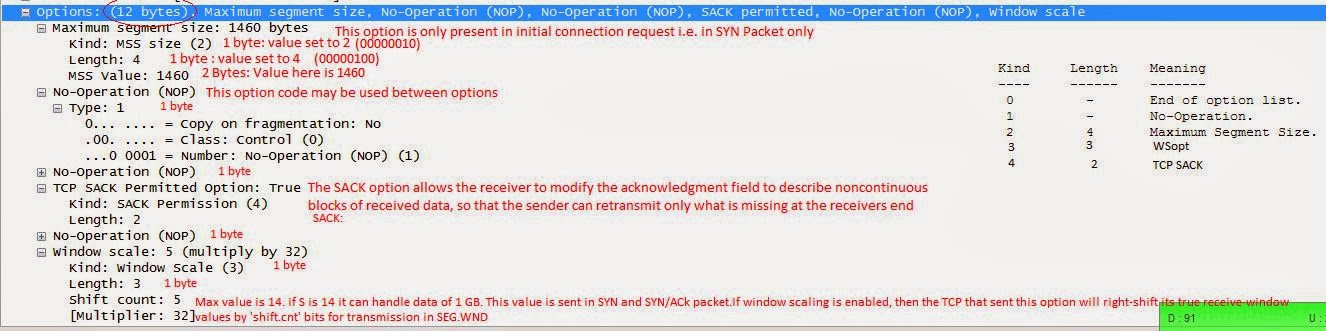
07:11:33.546865 PortB, OUT: IP SRC.48500 > DST.80: Flags [S], seq 1143423923, win 5840, options [mss 1460,nop,nop,sackOK,nop,wscale 5], length 0
07:11:33.800460 PortB, IN: IP DST.80 > SRC.48500: Flags [S.], seq 2495986521, ack 1143423924, win 14600, options [mss 1460,nop,nop,sackOK,nop,wscale 7], length 0
07:11:33.800545 PortB, OUT: IP SRC.48500 > DST.80: Flags [.], ack 1, win 183, length 0

I will explain the first packet and there after it will be easy for understanding the other packets:


07:11:33.546865 PortB, OUT: IP SRC.48500 > DST.80: Flags [S], seq 1143423923, win 5840, options [mss 1460,nop,nop,sackOK,nop,wscale 5], length 0


Will try to add my 2 cents on windows scaling in next blog

Cyberoam Slow Internet

Today, I had a long customer call. Cyberoam was very slow and was not reacting on the GUI menu click. The internet browsing was very slow. Total download bandwidth which was allotted to customer by ISP was around 15 Mbps but it was showing only 5 Mbps, when speedtest was done. Below is logical flow of the troubleshooting path which helped me to troubleshooting and resolve the issue:
==============================================================
Note: First create a plain firewall rule for a single IP address (LAN IP) and then check if behavior persists. If behavior persists then follow below steps. If not then there is some policy error applied on the firewall rule.  Usually an IPS policy. Try fine tuning the IPS policy. We can fine tune an IPS policy by removing unwanted signatures for example, there is no need to scan traffic for FTP vulnerabilities if the actual server hosted is SMTP.
==============================================================
1> Searching for brute force attack from WAN:

Browse through Logs & Reports > Log Viewer > Admin Logs. Checked there were lot of failed admin login attempts.

Action: Disabled WAN access on port 23 (telnet) and port 22 (SSH), both TCP. Disabled the WAN access to the Cyberoam on port 80 (HTTP). We can do this by browsing through
System> Administration> Appliance access (TAB).

2> DOS Attack:

Enabled the DOS settings and we could see lot of ICMP flood. We found that it was a users laptop in the LAN which was generating too much of traffic. Administrator helped us to remove the PC from the network as primary mitigation attempt. ( I will discuss in another blog how to check if any PC in infected and what are the steps to be used as process for security incident)

3> Still, the speed stuck at 5Mbps. Now I wanted to check if the application classification was causing the trouble. I have then disabled the application classification settings from CLI

Command: cyberoam application_classification off

4> Still, the same behavior 5 Mbps. Now it was to check the MSS settings.

Theory of MSS and MTU:  http://cyberoamexpert.blogspot.in/2012/02/mss-and-mtu.html

I started a tcpdump from the CLI for a particular IP on port 80 (Try TCP ports)

console> tcpdump "host 203.**.**.*** and port 80"

From an internal PC behind Cyberoam, we tried to telnet on 80 for IP 203.**.**.*** and we found below MSS values

First Packet : A SYN packet
07:11:33.546865 PortB_PPP, OUT: IP 184.**.***.*.48500 > 203.**.**.***.80: Flags [S], seq 1143423923, win 5840, options [mss 1460,nop,nop,sackOK,nop,wscale 5], length 0

Reply packet : A SYN/ACK
07:11:33.800460 PortB_PPP, IN: IP 203.**.**.***.80 > 184.**.***.*.48500: Flags [S.], seq 2495986521, ack 1143423924, win 14600, options [mss 1376,nop,nop,sackOK,nop,wscale 7], length 0

(I am going to add a new blog on understanding the TCP in more depth soon)

The highlighted values should match. We have changed the MSS values on port B of the Cyberoam from GUI Network> interfaces> Advanced settings> overide MSS

Speed went from 5Mbps to 14.86Mbps and thus resolving the issue.

Cyberoam Firmware nomenclature


Below is the naming conventions used by Cyberoam for firmware that are released. Its a brief description but I thinks it should be fine to gather a fair idea. I would like to add few important notes below:

1> If you upload and boot a firmware, which has architectural changes, the appliance will boot with new firmware and that will be the only firmware on the appliance. You can upgrade only with further new versions; there is no way to downgrade once uploaded and booted with architecture enhanced version.

2> 8*5 is must for upgrade to be appliance. No valid 8*5:: no upgrade.
3> No Valid 8*5 :: HA, Multi-link manager, Routing, Firewall, QOS, Identity, VPN, SSL-VPN will continue to work.


Tuesday, 11 February 2014

Cyberoam is now SOPHOS

http://www.sophos.com/en-us/press-office/press-releases/2014/02/sophos-acquires-cyberoam-technologies.aspx

QoS in Cyberoam

A couple of days ago, I was deploying a Cyberoam unit at a customer's site.We were replacing a Cisco Router with a Cyberoam unit. Customer was overall happy with the Cyberoam, however, He was unsure about QoS feature. The primary reason to replace a Cisco router with Cyberoam was to get a better performance in terms of security, since Cisco router was already being used as a Zone based firewall, the overall performance was not up to the mark.
Besides, configuring a Cisco router is a tedious task as compared with the Cyberoam.

However, as said customer was little suspicious about QoS, since he had 50 VoIP phones in the network. Let me tell you about Cisco QoS, It uses a very granular and efficient QoS feature/module. Cisco calls its QoS as MQC (modular QoS CLI) where in as the whole configuration of configuring class maps, policy maps and applying them to the services or interfaces is done through some specific CLI commands. The disadvantage here is that you really have to be a cisco CLI master in order to do the configuration, otherwise you are in the dock. On the other hand, Cyberoam is very easy to configure and play with and you dont have to be Cyberoam or security master to configure the things.

Cyberoam gives you complete control over the kind of traffic policing and control one would like to have over the applications and most importantly the users, which is missing in Cisco routers. In Cyberoam you have the control or power to prioritize or police the bandwidth for a web category or for a desired group of websites or URLs which is again not available with the Cisco router. 

Improved application control

I am a great fan of UTM devices that give complete and granular control over different layer 7 application. Cyberoam is one of the best Application control UTM. In one of my previous articles named A Fight for the best application filter, I mentioned about the fact that how applications have changed over the years but we have not seen any significant change in firewall.

Coming on to the Cyberoam, it is feature rich product and I can feel the kind of effort being put in cyberoam into making it a world-class product. Now, they have come up with improved application control features. Now, we have a new way by which Cyberoam has categorized different applications. I really liked this improvement. Cyberoam represents applications in accordance to:

1. Name
2. Category
3. Risk
4. Characteristics
5. Technology

Here is the screenshot:

This will provide more granular control for the users over the applications. I believe, this was a long pending feature, and at last we have it. Cyberoam can identify over 1000 applications which is better than some other UTMs,
With the improvement in the categorization, the reporting feature has also seen lot  changes.

 Reporting has always been one of the best features of Cyberoam. You really have to work on a Cyberoam UTM device in order to really feel what power it holds. The on appliance iview is one of the best Reporting system. It has an hawk eye and provide you drill down reports upto 3rd level for forensic analysis. The new reporting system is more faster and eye catchier with its instant horizonal, vertical and pie chart representation of the logs.


NTLM: Begining of an Era

At last Cyberoam has it what I always wanted to see in it since beginning. A single sign on method where now I have to no more install any .exe file on the my AD servers. Although I love the existing method used by the Cyberoam to implement its SSO (single Sign On), However I always had this challenge that many customers were not ready to install any software on their AD servers. The existing SSO method used by Cyberoam uses CTAS, It is a suite of softwares that is installed on the AD server, although it is a flawless way of performing the SSO process, But it had some challenges in the DHCP environment. I am sure introduction of NTLM in Cyberoam will overcome these challenges.
NTLM is actually a Microsoft feature which was used during Windows NT era. According to Microsoft it is a protocol suite that provides authentication, integrity and confidentiality to users. I know quite a few vendors who have incorporated the same technology to implement the process of Single Sign on.
So, as always I decided to test the new feature. Here are my results:

1. It worked for me the very first time, despite the fact that I had a little hard time in finding out the article from the Cyberoam KB.
Here are the articles that I used to configure the NTLM , browser and Cyberoam respectively:

http://kb.cyberoam.com/default.asp?id=2252&Lang=1&SID=
http://kb.cyberoam.com/default.asp?id=2251&Lang=1&SID=

2.  I was not able to find anything related to NTLM on AD in Cyberoam KB, however When I researched I found that we have to enable the NTLM on AD by following:
http://support.microsoft.com/kb/239869

3. When I heard about NTLM the first time, I thought it might slow down the attempts to access web sites, since it is a browser based authentication, but I observed no delay.

4. The company where I deployed NTLM recently had some reservations. The IT guy over there told me that Microsoft recommends NOT to use NTLM as it is not secure. I told him that it is just another feature that is on offer and other vendors too use it, although it is not secure but it is good enough to be used internally for authentication.

5. The deployment has been successful, I checked the behavior on multiple browsers on Windows and Linux. However, it will be interesting to see how it works on Mobile devices. For eg, blackberry OS, iPhone, iPad etc.

Few things I liked about NTLM SSO:
a) Very seamless
b) No delay
c) Easy to deploy
d) Works well with multiple browsers on windows and Linux
e) No installation of any kind of client on AD or end users

Note: Cyberoam says that it does not support NTLMv2, however when I used  NTLMv2 on AD, I faced no issues.
Cyberoam also mentions that only browser supported are IE and Firefox, but Chrome and Safari gave me no problems while using them.
I have not as of yet tested this using my iPhone, iPad or android. But certainly I will check it soon and come up with the results.

Cyberoam has now become a mature product and with the new features coming up it is surely going to make an impact in the market.


Monday, 25 June 2012

"Set it and forget it attitude"- Web Application firewall


Web Application Firewalls (WAFs) are an excellent last line of defense. They’re great at blocking both automated scans and granular exploits like Cross-Site Scripting and SQL injection. I recommend WAFs to partners all the time. But is there more to the story?

Unfortunately, more security vendors deploy WAF to cover up instead of looking to fortify their coding practices which led to vulnerabilities in their web applications. WAF has also replaced good old security practices of conducting regular audit and security scan. It's "set it and forget it". This is especially common with the compliance as a checkbox mode of operation that’s present in many businesses. Reminds me of what Firewalls with Stateful Inspection Technology were 10 years ago.

WAF would not protect you against application logic flaws. What about weak passwords in your web application? Another flaw that may go unguarded.

Good security practices like security monitoring, patch management, change management, incident response processes/procedures and most importantly security awareness sessions still hold good.

Whether you work for a large enterprise or a small business, just know that Web Application Firewalls are not the end-all be-all solution for your web security problems. They’re good at what they do. But like airbags in our automobiles, they can’t be relied on completely. To set up WAF and rely on it completely to protect your Web application is being short sighted and a recipe for getting bitten when you least expect.

The solution is to layer your web controls and look to fortify your coding practices. Web Application flaws are better fixed as the source by performing periodic scans, manual tests and review your code.

After you follow best practices for setting up Web Application, let WAF be the icing on the cake.

False Sense of Security - NGFW (Next Generation Firewall)

I am often questioned by my partners about how is Cyberoam different from the new buzz NGFW.  In reality, Cyberoam and new NGFW share many common features. 
UTM and NGFW are 2 different terms coined by two different analyst firms.  IDC coined UTM and Gartner coined NGFW.  One key difference is the technology used to deliver the functions.  It is believed that UTMs just provides multiple features on a single platform without integrating the features together.  Whereas NGFW delivers features like IPS, AV and application control while integrating these into Firewall.
NGFW Major features vs Cyberoam
* NGFW integrates security functions in to a single engine and define security controls through firewall.  NGFW also enables user based access control.
Cyberoam is a ID based firewall that implements Layer 8 technology.  It not only ties all the security policies and access controls to firewall, but also to the user.  You can apply Web Filter, Application Filter, Antivirus, Anti spam, QoS, IPS, VPN to Firewall as well as to a User/Group
* NGFW are believed to deliver wire-speed network security and suitable for large networks.
Cyberoam delivers high performance network security ranging from small to large networks.  It has firewall throughput up to 10Gbps with UTM throughput of up to 1.2 Gbps.
* NGFW optimizes application control
Cyberoam offers comprehensive Layer 7 Application Control, that is capable of identifying and controlling applications using standard and non standard ports and protocols, even encrypted SSL tunneled traffic.  Cyberoam identifies and controls more than 2000 layer 7 applications.  Cyberoam also does application based QoS, IM control as well as Data Leak Prevention.
* NGFW provides greater visibility with advanced monitoring and reporting
Cyberoam integrates custom built SIEM solution called iView for more than 1000 user based reports.  iView provides reports for Applications, web filter, threats, web trends, internet usage, as well as compliance reports.  It also provides module wise live reporting.  All logs and reports are stored on appliance hard drive. 
Conclusion
At the end of the day, NGFWs are just a subset of Cyberoam UTM

Thursday, 21 June 2012

Scare the Scareware

I remember that when I was in school, my Dad bought me a computer which was a Pentium 2 powered desktop. I invited most of my friends out of curiosity to have a look at my desktop. In those days there was a software that was given to me by one of my cousins from Canada. I must say it as a program, that once was run use to display some messages saying YOUR ALL DATA IS BEING DELETED AND THE SYSTEM HAS CRASHED. My friends use to run the program somehow and I use to scare the hell out of them. It was a prank and indeed included lots of fun. What I want to convey here is that such software or malicious programs are known as scare wares and are used by many hackers to cause anxiety and threat to the people.
Scare wares or better to call them as fake softwares are indeed the bitter reality for the consumers around the globe nowadays. A good example is of fake antivirus softwares, the cyber criminals use social engineering to install a malicious code on the computers of the consumers. Once this code is installed, it starts displaying fraudulent alerts with fake messages. Below are such screenshots displaying fake messages.

The people usually fell into the trap due to the fact they get scared enough after reading such messages. These alerts prompt users to visit such websites to buy and download fake softwares to clean threats which never exist.

For cyber criminals, it is a lucrative business to threat people and steal their money by prompting them to buy fake softwares. This class of malwares scans the computers and comes up with a collection of junk files and data.  To prove their legitimacy, these softwares will have names such as:

1. Internet defender
2. Security shield
3. Smart internet protection
4. Malware protection 2012

These malwares can also cause further distress among the users. They can interfere with the normal functioning of the system. They will terminate the processes, for example it will never allow you to run task manager. They can also force web re-directions where in as each and every time you try to access a web page you will be re directed to some or the other link. These softwares are also infamous for downloading further malwares like banking trojans or rootkits etc.

So, we can conclude here that scare ware malwares will be an ongoing problem which will continue due the fact that it involves monetary gains for the cyber criminals.

I was curious to find out weather my Cyberoam can take care of these scare wares. But, first of all I wanted to know what all features I have at my disposal to protect my users against such malwares.
Here is my verdict after some long testing:

1. Cyberoam's anti-virus engine is fabulous, I really mean it. I was not able to download any of the malicious software.  I think nothing can be said more about it.

2. Secondly, I went ahead and enabled the Anti-Pharming feature of the Cyberoam, after which Cyberoam re resolves the DNS for the URLs with the DNS server configured in the appliance itself. This is by far the best way of protection against the redirectional links, directing the users to malicious websites instead of the original website.

3. On further research, I hit a couple of very interesting web categories, "SpywareandP2P" and "PhishingandFraud". I am not sure how the guys at Cyberoam do the categorization, but believe me it is really effective. I found several websites being denied by the Cyberoam when I applied them.


By the way I refered to http://www.spywarewarrior.com/rogue_anti-spyware.htm#products for testing purpose. You can try the same to test Cyberoam's capabilities in protecting your network.


Wednesday, 6 June 2012

Cyberoam Demo


One of the coolest features I like about the Cyberoam is Reporting part. I was able to impress many customers with its reports. Cyberoam claims to have more than 1400 reports. Most of these reports are Identity based, which means which user, what site, what amount of data, what time.....cool.

So in simple words, you really do not have to worry about the IP address any more. What’s more?

Well, it’s free of cost.

Seriously, we do not have to buy any hardware or software to generate logs. To check the authenticity of the logs, we requested few of our customers to keep an eye of the logs and surprisingly most of the events have been logged.

So if a user browses any unhealthy site, it will be logged. If he tries to access any application not allowed he will be logged. Everything is logged.

Recently we were at our customer to impress him about the Cyberoam functionality. But unfortunately, their current network does not allow SSL VPN ports (8443 default). So we tried to access the Cyberoam Demo site. We logged in, we explained him every feature. Then we were to show the reporting part to customer.

We came back to office and wrote requesting Cyberoam to include graphs on the Cyberoam Demo. There is no point in having a demo without any reports online. Though we had some screenshot to show them, but a live demo should be capable to show some reports.


Let's see when we will be able to see the Cyberoam with logs on demo.cyberoam.com

Thursday, 24 May 2012

Most common myths about the network security


Myths about network security
1>     I am anonymous on internet:
2>     Having a security appliance will require dedicated manpower
3>     The threats are only from outside
4>     I am secure if I am accessing HTTPS
5>     Installing firewall : I am secure

1>     I am anonymous on internet:

This is a common myth most the administrators are under. They do not understand that to bring down a big target, hackers target small organisations. The reason for this behaviour is obvious; they want to cover their tracks. Hackers create zombies in smaller networks and try to bring down bigger network. When doing a forensic analysis it will always be your network under the RADAR.

2>     Having a security appliance will require a dedicated manpower

The Cyberoam UTM appliance is all in one solution and does not require any dedicated manpower. Companies can use their existing manpower to control their internet traffic. The products is very simple to configure and its plug and play device.

3>     Threats are only from outside

Most of the administrators feel that threats are only from outside. This is great myth of all, as the threats from inside is equally distributed to threats from outside. More than 50% of the threats are from inside. Free surfing on the internet will invite virus, Trojan and worms inside the network and thus will reduce the speed of the whole network. You will buy new switches which should be working at great speeds and at the end of the day you will still find them working the same as before. The worms eat up your bandwidth due to broadcasts and Trojans can launch attacks from inside the network. If your email server gets compromised you will see your public IP getting black listed.

4>     I am secure, if I am accessing HTTPS

This is where you get a false sense of security. When you see secure protocol you should never feel full secure. Security is never full and complete, it’s a constant evolution. So you should always update yourself with new technologies and then remember to use your brain before implementing it as a solution.

5>     Installing firewall : I am fully secure

The firewall just a primary security but what about the ports which you have bypassed like when you are using a web server, FTP server or email server. You have opened these ports directly from your firewall. Now there is no protection on these ports except checking the state of the connection and DOS check. Many other attacks like URL redirection, XSS attacks, Buffer overflow attacks which could seriously damage your reputation are ignored. 

Wednesday, 23 May 2012

Most important things your firewall should do

We have recently organised a customer meeting, where we have invited most of our customers and requested them to the poll for the most important things a firewall should do. This is a regular operation we do.

How this helps us?

1> increased satisfaction of the customer because we care
2> customers tends to learn new threats
3> New customers who appreciate the need of security
4> awareness of new technologies released and how its going to help them
5> a common platform to discuss existing network problems and their solutions

After many suggestions and many reviews we have decided to list them down. The list which will help most of the customers to take a better decisions while buying a new security product or when they are ready for renewal or when they want to replace existing solution

The attacks have grown mature, the users went mature, the applications are more mature but most of the appliances are not ready for this challenge.The attacks can be blocked from WAN but what about the new threats. These new threats are also known as Zero day attacks. The products are not aware of these threats.

So to provide a check list we came up with Top 10 list and below are the important list of these features:

1> Intelligent and advanced Application filter with bandwidth control

The advanced application filter should identify applications which are running on standard ports. Like HTTP i.e. port 80. Port 80 has simple web traffic, IM traffic, CRM traffic, streaming media traffic. Most of our customers wanted a solution which will allow steaming media on port 80 but with a limited bandwidth. If a solution can not identify the streaming media on port 80 its very difficult to manage your limited bandwidth. Along with that many online movies sites and live TV can also be differentiated and should be limited on usage.

Another set of bandwidth hungry applications are the p2p applications which eat up your most important resource i.e. bandwidth. Recently one of our customer complained slow browsing, we installed a solution just to find most of the users were bringing their laptops with P2P applications still active when they come from home. They were not only choking up the bandwidth but also risking the network with new Virus, worms and Trojans.

2> A True identity based solution

Some users are very aggressive. They launch an attack deliberately or accidentally and the organization looses important data. Most of the organizations trust their employees and we seldom hear these but the truth is these things never come to light unless they occur to important organisations. So administrators right choice is to identify the users who take advantage of this trust.

Also, most of the attacks are not from outside but inside like spam. we want to identify the users and then block them. The identity based solution should also have the ability to allow admin to create granular policies over the users.

Now that we are aware the user is the weakest link in the security his activities should be monitored regularly.

3> Live view of the network

Once the user has been identified, the solution should be capable to show how much of bandwidth is being consumed by each user or application. The data is very important for the optimizing the network performance. When you keep these advanced solutions in your network, you will be amazed to see so many applications being used which are chocking your bandwidth. Based on the live reports, you can take immediate actions on the users.

4>  Anti-Spam

Spam is very ugly truth. With no solution your email server and your users can be easily compromised and soon your IP will be blacklisted. Once a IP gets blacklisted, we all are aware of the hardships we have to go through to get it unlisted. A true spam solution should be able to catch spam in any language or format. Also, it should be capable to block spam at the gateway level itself.

5> WAF

In my earlier thread I have explained the use of WAF and its requirement. To refer it kindly browse through below link
http://cyberoamexpert.blogspot.in/2012/05/cyberoams-waf.html

6> Web Category based Bandwidth control:

One best example is the Facebook or social networking sites. These social networking sites are very good and I am big fan of them. Recent study also showed that the allowing the users to do facebook increased the productivity of the employees. But that does not mean that users should be given full bandwidth to these networking sites. So a true solution should be capable to implement the bandwidth policies on these sites. So users can enjoy the site but at a limited bandwidth.

7> Logging and Reporting

A true solution should include inbuilt logging and reporting solution. The reporting should be very elaborate and should not require any external device or software. Howerver, it should also provide a facility to generate logs and reports to a syslog server.

8> SSL VPN

I like working from home as many of us do. But it gets difficult to work if I am not able to access resources securely. The solution should allow users to login from home and work safe and secure. SSL VPN is best as its secure and provides mobility.  While client to site is also better way but a SSL VPN is truly a best solution.


All our customers were very satisfied with the list as it really helped them to choose the right product!


Monday, 14 May 2012

Cyberoam's WAF


Web Application Firewall.


In the continuation to my previous article where I mentioned about the new features released by Cyberoam, one of the key and important feature is that of Web Application Firewall. It is not a new term or technology in fact there are already UTMs and open source projects offering the Web application security. So you might be wondering what new Cyberoam is offering with this feature or some smart heads might be thinking that Cyberoam is catching up with its competitors. Yes, it could be true to an extent; however, the true mettle of the feature depends on what is on the offer and this where Cyberoam has more impact over its competitors.
WAF or Web application firewall is a plug-in, or a filter that scans any http connection with certain set of rules. In general, these set of rules are enough to overcome certain type of common attacks like SQL injection or Cross site scripting (XSS). Now, you can customize these set of rules in accordance to your knowledge and requirement which in turn can help you in indentifying and blocking various attacks. This is the point where Cyberoam scores over all other web application security solutions available in the market.


Why do we need a WAF?
Web or the World Wide Web is frequently referred to as the next battle ground. The countries around the globe nowadays fear that the next world war will be fought on the internet and attacking the web application servers will be one of the most important types of attack.
Despite the incident of dotcom bubble burst the dependency of the world on Web has not decreased. Web sites and web applications are growing rapidly. Businesses worldwide have moved on to use more and more complex applications on http. The phenomenal dependency of businesses on the web has made them prone to various attacks. Over the past decade or so we have seen a lot of increase in the hacking activity. Various attacks like, work attack, SQL injection have taken the toll of business to a much larger extent now.
Most of you might wonder that these attacks can also be stopped by a firewall then why do we need a WAF? However, the point is that a firewall cannot stop these attacks. Here is the list of attacks that a firewall cannot detect or stop: 


1.     URL interpretation attack
2.     Input validation attacks
3.     SQL injection attack
4.     Impersonation attacks
5.     Buffer over flow attacks
6.     Cross site scripting 


Above is just a partial list of attacks that cannot be stopped by your perimeter firewall. There are many other attacks that you firewall can never even detect off and your web services can easily fell prey to deadly hackers.
So, you cannot deny the fact that despite deploying a firewall in your network you need a WAF to protect the web server and web applications.


Cyberoam as a WAF:
Yes, now Cyberoam has an inbuilt feature of Web application Firewall. Cyberoam’s WAF helps in you in achieving the following major organizational concerns/questions with respect to the web services on offer:
1.     How can you secure your web applications?
2.     How can you insure that only authenticated users get access to the web services?
3.     How can you insure the acceleration and speed of the applications?
4.     How to insure the scalability of the web servers with the growing number of users?
5.     Validating the input of the users on the web forms?
However, before we talk more about Cyberoam as a WAF, Let us have a look at the challenges faced by current WAF products which are in the market.
The major challenge is in the form of too much of security, I mean to say, some products like Barracuda WAF provide too much of security that there have been instances that even legitimate users have been deprived of work. This actually may sound funny but it is true for many other products as well.
Other challenges can be listed as below:


1.     Penetration of database monitoring
2.     Prevention of hacking, data theft
3.     Provision to work as IDS(Intrusion Detection System)
4.     Notifying as well as rectifying the security loopholes.
5.     Prevention of cookie poisoning and session hijacking
6.     Less scanning time for the data
7.     Efficient and effective filtering of http/https requests
8.     Moulding itself to detect and prevent new attacks
9.     Customization of http/https scanning rules


While testing the Cyberoam WAF I found all the challenges being overcome. I tested it against my word press website linked to a JDBC. While products like Barracuda, Semantic, Citrix, Imperva etc failed in overcoming one or the other challenges listed above. However, Cyberoam has no reporting feature which actually is a point that goes against it when we compare it with dedicated WAF products.
I am more interested in testing Cyberoam’s WAF against Astaro’s WAF (Since Astaro is only UTM offering inbuilt WAF), where in as later uses signatures to detect and prevent attacks. I have never been a great fan of technologies using signatures and this is no deferent. The huge issue I see with signatures is that they need to be updated regularly which is a big overhead. Since Cyberoam uses intuitive active and passive modes to detect and prevent attacks it is far more effective and efficient then Astaro.
Cyberoam’s WAF is so intelligent that in real time environment it is quickly able to notice the behaviour if web applications that you have in your network and then it moulds itself to protect them automatically. How does it do so? It is still a mystery. May be I can get a hint from Cyberoam support.


Friday, 4 May 2012

New Features released by Cyberoam.

Cyberoam has released a new version for all the existing models this week. I had a chance to go through the release notes and found things quite interesting.
I have always viewed Cyberoam as a competitive product and with the coming of new features it is creating a niche of its own.

The newly released version is 10.02.0 Build 206 and with this Cyberoam has bought a a new set of features. Here are the features that I have been talking all through:

1. Mix Mode
2. FQDN Host and Host Groups
3. Guest Users
4. Differentiated Services Code Point (DSCP)
5. Captive Portal URL Redirection
6. Hit Count in Mail Summary Reports
7. Country Based Traffic Control
8. WAF – Web Application Firewall
9. NT LAN Manager (NTLM) Authentication Support

The features here have a lot to offer and I will not do any justification by going through all of them in this article. So, In the upcoming weeks I will post more information about these features after doing some testing and playing with them.

Besides these features, there are some enhancements that have also been announced with this new version. These enhancements were long awaited and at last Cyberoam have them.
Here are is the list of the enhancements done:

1. GUI Enhancements
2. DNS Optimization
3. Virtual Host Enhancement
4. IBM server terminal support in SSLVPN
5. Dynamic Interface Support
6. Search using IP Address
7. Customized Wireless LAN

We will again talk about these enhancements in a separate article later.

Every new version has also some bug fixes, so this version is no deferent.  I will test and display the list of the bugs fixed in the new version in the upcoming articles.